- cross-posted to:
- technology@lemmy.world
- opensource@programming.dev
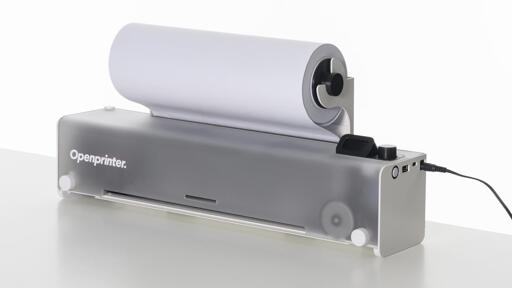
- cross-posted to:
- technology@lemmy.world
- opensource@programming.dev
I stumbled across this link in the comment of another post, and thought it was super promising!
Someone mentioned something about in the US, this would be illegal due to DRM laws - not sure about the specifics of this, but regardless an open source printer seems like something we’ve needed for ages, as printers are something that always seem like way more of a headache then they need to be. It seems like such a simple technology that has existed for quite some time, but they are always such a pain to deal with. (Maybe it’s just my bad luck with printers?)
You must log in or # to comment.
The only thing we are missing is a scanner. Now if only we had a FOSH-Scanner (FOSH = Free & Open-Source Hardware)
Just what I was going to say. Yup.
pretty stupid that we need shit like this in the first place, but thank foss this exists.
>inkjet
LED printers have been around for fucking ever, and the average person doesn’t need the graphic fidelity that only an overpriced pigment soup, which goes bad in a month, can supply.
Oh, and literally every part of a toner-based printer is easier to replace/repair… so why would a printer designed around repairability and upgradability use ink???
Edit’ And I almost forgot: toner is cheaper per page than ink! Whyyy???
because it makes it way more easy to build such a “open source” printer, the print head with all its mems chips structures is already on the ink cardrige, meaning hardware wise this thing is just a 2 stepper motors, one for x and y axis.
laser/led printers would be in fact the superior printer, but it would also be way more complex hardware wise.
This. Based on my (elementary) understanding of laser printers, you have to have a laser zap a transfer belt to charge it so that it will elecromagnetically attract the toner, then precisely lay down a fine layer of toner onto the belt, then lay the microplastics + iron filings from the belt onto the page, repeat this four times, then roll the page through a tiny oven to bake on the thin, shiny layer of plastic. It’s very complicated, and have you seen the price of new fuser units or transfer belts?
I had a brother laser printer with a pre-heating roll that went bad. Sourcing a replacement for that was pretty annoying. But I get your point.
They’re taking an HP printer head and customizing only the motors and controls. This is a lot easier but also a lot more reliant on HP
I mean, toner is also made out of microplastic and iron filings.
toner is cheaper per page than ink! Whyyy???
I think a toner re-fill is a little harder to get/make/do.
Thanks to the proliferation of portable devices, a lot of people no longer need a printer for “regular” printing at all in 2026, and some of the more interesting printing substrates either don’t accept toner well or won’t survive the heat of a laser printer’s toner setting stage.
Also, while the technology is theoretically simpler, it may be harder for an individual to source or make the physical components like rotating drums and high-res LED arrays.
a lot of people no longer need a printer for “regular” printing at all in 2026,
Isn’t this an argument for toner over ink? From my understanding, ink is far less shelf-stable.
Only if what you are printing onto is regular paper. My contention is that since printing itself has become a somewhat niche act for individuals printing at home, they’re more likely to be printing for specific reasons, which means that they’re more likely to want to print things like transfers or other specialized substrates that may not work well with laser printing.
Yes, I believe that laser printer toner lasts longer than fluid ink, although ink can last for years when stored in a properly sealed bottle rather than in a cartridge inside the printer, which is possible with a user-fillable cartridge.
Not only that; I’ve read that ink-jet printers need regular use to keep blockages from forming. Anecdotally, our printer seems to need printer head cleaning whenever I actually use it.
By the way, your comment has a formatting issue.
deleted by creator
I think it might largely depends on your 1. Career/job/ or even hobby requirements 2. Where you live (government agencies requiring paper documents, signatures, etc)
- I like a printed copy of recipes (I put them in page liners so they’re reusable and cleanable). Books on the counter suck.
- kids have projects to do.
- not everyone does e signatures so you have to print it sign it then scan it.
There’s more. I’m just bored.
If printers didn’t suck I may consider using them by choice. Does also depend on cost per page, which I suppose varies by what you print.
I print recipes (don’t want to worry about spilling on devices), worksheets for my daughter, and gov’t/bank documents that require physical signatures. Occasionally I’ll make a print and play game as well.
I don’t like the obsolescence cycle of tablets.
“Coming soon” for months now, I’ll believe it when I see it.
You don’t use “soon” in geologic time?
It’s actually a measure of distance.
In dog
years
Could have a single picture of it that isn’t a render, to start
Those are photographs…
inkjet :(
CC BY-NC-SA
Not open printer. Not open source. You will only be able to get replacements from them, worse than some other printer companies…
Not sure why you’re spouting complete bullshit and where your basing those statements on.
It pretty clearly states you’ll be able to 3D print parts yourself. It’s also using a Raspberry Pi inside, which I’m fairly sure you can buy wherever you want, so saying you can only get parts from them is complete bullshit.
Are you a shill for printer companies or something?
NC - non commercial. Nobody is alowed to sell you the printer nor replacements. Yea you can print it yourself, for that 1% that has a printer.
Maybe actually learn to read what this applies too, the website is very clear on this.
Their own parts are open source, the rest are readily available components.
The BY-NC-SA 4.0 is not an open source license. This printer is not open source. Stop calling it. Even if they themselves call it that way, or “open”.
It wont work worse as any other printer
It’s not like the bar is anywhere but on the floor though
Why not use USB-C for power?
USB C is awesome for the electrics but mechanically mid range
I’ve been seeing this thing for months and there’s been no updates. Is there any word on release date/price, I really how this isn’t vaporware.
Printhead compatibility: HP 63 (US), HP 302 (Europe)
Sounds like it comes with a refillable cartridge, but you can also use off the shelf HP cartridges.
And since there’s no DRM, 3rd party cartridges will work too.
HP Inkjet cartridges though

#Your printer includes tracking codes on every page you print
Including the serial number and where the printer was sold. https://en.wikipedia.org/wiki/Printer_tracking_dots
Ah you beat me to it!
Yep.
This is the real reason that an open source printer would get a ton of pushback… it would make it so that law enforcement agencies can’t use the detailed, near invisible, functional serial numbers that snitch on all their users.
Bring back the Scrolls!
AWESOME!!!
The images and videos scared me a bit, thinking this only supports rolls, but seemingly it does also work with A4.
The roll+cutter allows printing in both A4 and A3 which is amazing.
Yeah, it is nice.
It looks like it is a roll as an input, but the printer has an integrated cutter.
Edit: looks like I was wrong

Found on another page: https://www.opentools.studio/
It clearly says…
Supported paper formats
North American letter, tabloid, and 11-inch wide paper roll European A4, A3, and 297 mm-wide paper roll
I guess then A4 is supported as an input.
Yeah, that’s what I read.
Looks like I was wrong. There is animation showing that it cuts A4 out of the roll and no pictures without roll.
But I found one with A4 loaded here: https://www.opentools.studio/
Nice :D Thanks for linking the image.
deleted by creator
Why oh why did they place the power barrel connector on the side like that?
Looking at one of the images, probably so you can wall-mount the printer
Yes you can:
“… its flexible design can adapt to your workspace, working when installed on a wall or placed on a desktop.”