

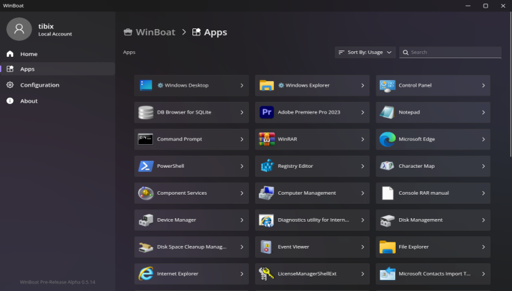
The developer explains it should run basically everything unless “it requires strong GPU acceleration or kernel-level anticheat”.
That is a lot of use cases people have for Windows only applications.
I imagine this is more for productivity apps, where gamers are going to use proton or wine.
Isn’t wine meant for non-gaming apps too?
It is, but most modern software doesn’t work at all in Wine. I have 2 apps (Paint.net, and SketchUp Make 2017) which don’t have any real alternatives (or they suck) for Linux and they don’t work in Wine.
Instead of running compatibility layers, it runs a real copy of Windows using Docker and KVM under the hood.
I take it that it requires a Windows license then, I’ll stick with wine.
I’m assuming it’s using the dockur/windows image* the same as WinApps, which seems to be pre-registered ime.
Didn’t we already have this same thing with a different name? https://github.com/winapps-org/winapps
From their FAQ
With WinApps you do the bulk of the setup manually, and there’s no cohesive interface to bring it all together. There’s a basic TUI, a taskbar widget, and some CLI commands for you to play with.
WinBoat does all the setup once you have the pre-requisites installed, displays everything worth seeing in a neat interface for you, and acts like a complete experience. No need to mess with configuration files, no need to memorize a dozen CLI commands, it just works.
I’ve tried both. WinBoat is on a whole different level of easy. You just download it, click next about 3 times and you have a working Windows VM providing Windows apps that run alongside your native linux apps.
It doesn’t get any easier than this.
Wait it does that using a VM? So even apps otherwise not compatible linux will work?
Fusion is about the only thing keeping me on windowsAutocad Fusion 360 ? Forget about it. Winboat doesn’t support GPU passthrough yet, so it will run sluggish as hell.
You either…
- wait for WinBoat to support it (if it ever does)
- learn how to virtualize and do GPU passthrough on your own
- switch to freecad which is very powerful
Check out this comparison of Free and vs OnShape:
it runs a real copy of Windows
then just run windows; at that point if you’re going to buy a license for windows, why go through hoops?
So now suddenly us lemmy linux tech nerds forgot about mass…🙄.
Unless that isn’t possible to run, then correct me pls